Tools:
When it comes to building a PC, having the right tools can make all the difference between a smooth, stress-free experience and a frustrating one. While assembling a computer doesn't require a huge toolbox or expensive equipment, a few key items will help you work efficiently, stay organized, and avoid damaging your components. This page is your go-to guide for gathering everything you need before you start putting your build together.
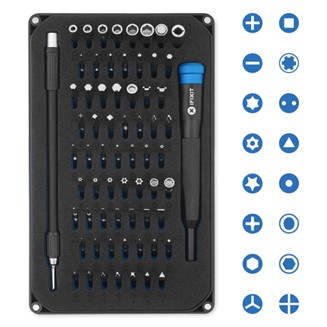
Let's start with the most essential tool of all: a screwdriver toolkit, like the ones made by iFixit or similar brands. These kits typically include a variety of interchangeable bits—especially Phillips #0, #1, and #2 sizes, which you'll use the most. The advantage of a full toolkit is that it also prepares you for future upgrades, laptop repairs, or working with delicate electronics. A magnetic driver handle makes installing screws inside your case much easier, especially in tight spaces where dropped screws are hard to reach. Having a complete set ensures you won't get stuck looking for the right size bit mid-build, and some even include flexible extensions or angled adapters for extra tricky spots.
Next up: tweezers or small needle-nose pliers. These are incredibly helpful when dealing with tiny screws, jumpers, or connectors, especially in tight spaces where your fingers just can't fit. They can also be a lifesaver if you accidentally drop a screw into your case (it happens to everyone).
Flashlights or a headlamp are another must-have—especially if you're building in a case with dark interior panels or working in a dimly lit room. Clear visibility is key to making sure connectors are lined up properly and components are seated correctly.
While not mandatory, a thermal paste tube is something every builder should have on hand. Most modern CPU coolers come with pre-applied thermal paste, but if you're upgrading a cooler or reseating a CPU, you'll need to apply a fresh layer. Thermal paste helps transfer heat from the processor to the cooler more effectively. Having a small tube and a plastic spreader or card can help you apply it evenly.
Cable ties/zip ties are essential for keeping your build clean and organized. Neatly routing and securing your power cables not only looks better, but it also improves airflow inside your case, helping your system stay cooler. Keep a pair of scissors or flush cutters nearby to trim excess ties when you're done.
A small container or magnetic parts tray is a great way to keep your screws and standoffs organized during the build process. There are a lot of little screws involved in PC building, and they're easy to misplace. Using a tray or even a small cup can keep them safe and within reach.
Another often-overlooked item is an anti-static wrist strap. Static electricity can damage sensitive PC components, and while the risk is low if you're careful, it's better to be safe than sorry. The wrist strap clips onto a grounded metal object and helps prevent static buildup while you work. If you don't have one, touching a metal part of your PC case periodically can help discharge any static from your body.
If you're installing an operating system from a flash drive, you'll also want a USB drive (8GB or larger) prepared with the OS installer. And while not a physical tool, having access to a second device like a laptop or phone can be a huge help if you need to look up installation guides or troubleshoot during your build.
Lastly, patience and curiosity are two of the most valuable tools you can bring to the table. Building a PC is a step-by-step process that rewards attention to detail and problem-solving. Don't rush—take your time, double-check your work, and enjoy the process.